
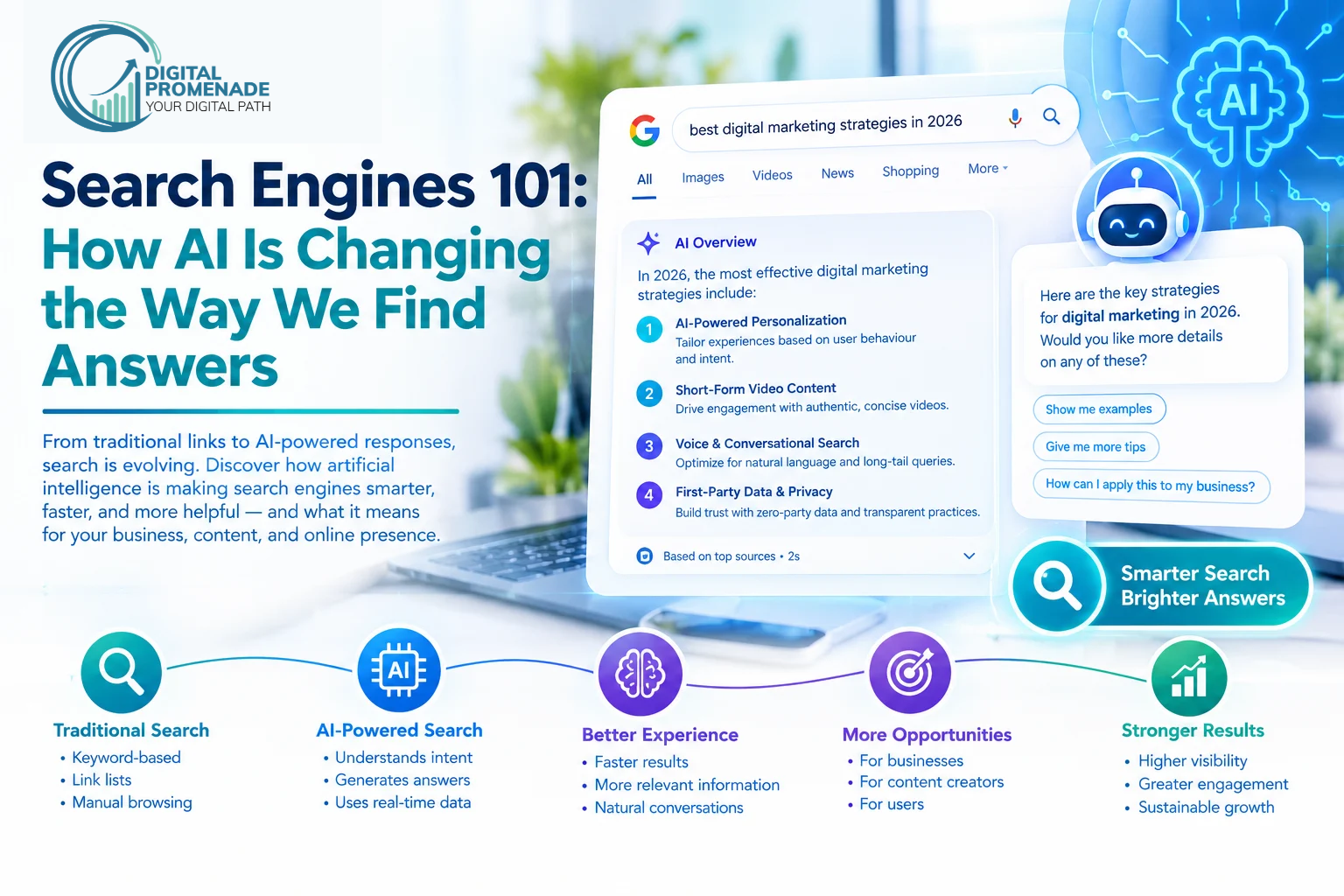
Search Engines 101: How AI Is Changing the Way We Find Answers
Search engine basics come down to three jobs: a search engine finds pages (crawling), stores them (indexing), and orders them for each query (ranking). AI now writes the answer on top of those jobs, so your pages have to be found, understood, and cited.
Most people use a search engine dozens of times a day and never see how it works. That gap costs businesses money. An owner publishes a page, it never gets indexed, and they blame the algorithm or pay for fixes they didn’t need. This Search Engines 101 guide covers the mechanics in plain language, what AI changes, and what you can do this week.
Book a Free Consultation – digitalpromenade.com
What are search engine basics, and why do they still matter?
Search engine basics describe how a search engine finds web pages, stores them, and decides which to show for a query. A search engine is software that searches a pre-built catalog of web content and returns the best matches in under a second.
We hear two mix-ups all the time. A browser is not a search engine: Chrome opens websites, and Google suggests which ones to open. And search engine basics are not SEO. The basics describe the machine, while SEO is what you do to your site so the machine can use it.
The basics still matter because AI answers sit on top of them. A page that crawlers can’t reach never gets indexed, and a page that isn’t indexed can’t be cited in an AI summary.
Short version: search engine basics explain how pages are found, stored, and ranked. Every AI search feature depends on that foundation.
How does a search engine work, step by step?
Google describes its process as three stages (crawling, indexing, and serving), and says not every page makes it through each one. The full explanation is in Google’s guide to how Search works. google
| Stage | What happens | What goes wrong |
| Crawling | Bots follow links and sitemaps to find pages | Blocked by robots.txt, server errors, no internal links |
| Indexing | The engine reads and stores page content | Duplicates, noindex tags, thin pages |
| Ranking | Algorithms score indexed pages against the query | Weak relevance, low authority, poor page experience |
| Serving | The user sees links or an AI answer | Another page outranks you, or the AI cites someone else |
How do search engines find pages?
Crawlers such as Googlebot follow links from page to page. You can speed this up with a sitemap, which lists the URLs you want found. If a section should stay private, a robots.txt file tells crawlers to stay out.
How does a search engine store what it finds?
After a crawl, the engine works out what the page is about and files it in the index. The index works like a library catalog. When you type a query, the engine searches that catalog and does not search the live internet, which is why results arrive so fast.
How does a search engine decide the order?
Ranking compares your query with indexed pages using hundreds of signals, including relevance, content quality, freshness, links from other sites, and page experience. No engine publishes the formula. Google also states that it doesn’t accept payment to crawl a site more often or rank it higher. Anyone who promises otherwise is selling you something.
What does the user finally see?
The engine picks the best format for the query. That might be blue links, a map, a video, a featured answer, or an AI summary.
Short version: engines crawl to discover, index to store, rank to order, and serve to display. A page that fails one stage can’t succeed at the next.
What is a search engine index, and why isn’t your page in it?
A search engine index is the database of pages an engine has analyzed and decided to store. Getting crawled doesn’t guarantee getting indexed. Google says indexing isn’t guaranteed for every page it processes.
When a client tells us “Google ignores my page,” the cause is usually one of these:
| Cause | How to spot it | Fix |
| noindex tag | The page source contains a noindex directive | Remove the tag |
| Blocked by robots.txt | Search Console reports “Blocked by robots.txt” | Edit the rule |
| Duplicate content | Google picks a different URL as canonical | Add a canonical tag or merge the pages |
| Thin content | The page repeats what fifty others already say | Add original detail and examples |
| Orphan page | Nothing links to it | Link it from related pages |
For a quick check, search site:yourdomain.com/page-url in Google. If nothing comes back, the page is probably not indexed.
Short version: the index is the engine’s catalog. Pages miss it because of blocking rules, duplication, thin content, or missing links, and each of those has a direct fix.
What types of search engines exist today?
There are five main types, and the lines between them are blurring.
| Type | How it works | Examples |
| Crawler-based | Builds its own index from crawled pages | Google, Bing |
| Meta search | Sends your query to several engines and merges the results | Dogpile |
| AI answer engines | Write a response, usually with source links | ChatGPT, Perplexity, Gemini |
| Site search | Searches one website only | A store’s product search bar |
| Vertical search | Searches one kind of content | YouTube, Amazon |
A meta search engine doesn’t crawl the web itself. That’s the main difference from Google.
Short version: crawler-based engines build their own index, meta engines combine other engines’ results, and AI engines write answers. Your content has to work in all of them.
How is AI changing the way we find answers?
AI changes what search returns, not how pages get found. Traditional search hands you ten links to open. AI search reads several sources and writes one answer. We build for both through our AI SEO services, because AI search optimization still depends on pages that are crawlable, indexed, and trusted.
| Traditional search | AI search | |
| Output | Ten links | One written answer |
| Query style | Short keywords | Full conversational questions |
| Winning metric | Position on page one | Being cited in the answer |
| Main signals | Links and relevance | Clarity, authority, structured answers |
What is the difference between AI Overviews, AI Mode, and AI chat tools?
AI Overviews add a generated summary above the usual results. AI Mode is a separate conversational experience inside Google. Chat tools such as ChatGPT, Perplexity, and Gemini answer questions through their own retrieval systems. Each picks sources a little differently, and our guide on how to rank in ChatGPT and Gemini covers those habits.
Short version: AI turns a list of links into a written answer. You now want to rank and get cited, and both rest on the same search engine basics.
Why are zero-click searches rising?
Results pages now answer more questions directly. SparkToro’s analysis of Similarweb clickstream data found that 68.01% of US Google searches ended without a click in the first four months of 2026. You can read the original in SparkToro’s 2026 study and the coverage on Search Engine Land. searchengineland
The numbers worth knowing:
- The share of searches that produced at least one click fell 9.51 percentage points between 2024 and 2026.
- AI Overviews now appear on more than 20% of Google searches.
- Estimates of click loss when an AI Overview appears vary by study. One source reports a 38% drop in organic clicks, while another reports a drop of roughly 60%, so treat any single figure as a range.
- Only 0.34% of searches moved into AI Mode during the study window. It is still small.
One caution before you quote the trend: SparkToro measured 2024 and 2026 on different clickstream panels, so the change over time shows direction more than exact size.
Which searches still send clicks?
Branded searches, local business queries, and high-intent transactional searches are less affected than informational queries. That’s why we still push local SEO hard for service businesses. Our breakdown of how Google AI Overviews affect click-through rates goes deeper. techwyse
Short version: roughly two in three US Google searches end without a click, mostly informational ones. Brand, local, and buying searches still send traffic.
How do you make your website easy for search engines and AI to understand?
Remove the crawl barriers, answer questions directly, and structure each page so a machine can lift a clean answer. Work through these in order, because later steps fail if earlier ones are broken.
Step 1: Confirm crawlers can reach your pages
Check robots.txt, fix server errors, and give every important page at least one internal link.
Step 2: Submit an XML sitemap
List only canonical, indexable URLs and submit the file in Search Console.
Step 3: Match each page to its search intent
Decide whether the query wants a definition, a comparison, a how-to, or a purchase, then build the page in that format. Our search engine optimization services start with this mapping, since the mismatch between intent and page type wastes more content budget than anything else we see.
Step 4: Lead with the answer
Put the direct answer in the first sentence or two under each heading, then explain. Readers like it, and AI systems extract these passages. Our content writing services follow this pattern on every page.
Step 5: Structure the page for machines
Use real H2 and H3 headings, short paragraphs, tables for comparisons, and schema where it fits. We explain the format in our guide to AI-ready content.
Step 6: Earn trust off your own site
Reviews, mentions on industry sites, consistent business details, and named expert authors all help. Our write-up on Perplexity SEO shows how that engine picks its sources.
Step 7: Update and measure
Refresh pages that slip, and track impressions, clicks, and AI mentions together.
Short version: open the crawl path, match intent, answer first, structure the page, build trust elsewhere, and keep measuring.
How do you use Search Console impressions to find what to write next?
Impressions show how often your page appeared in results, so they reveal demand before clicks arrive. Find queries with high impressions and low clicks, then fix the pages behind them.
- Open Search Console, then Performance, then Search results.
- Set the date range to the last 3 months and filter queries containing “search engine,” “crawling,” or “indexing.”
- Sort by impressions and note queries with a low click-through rate.
- Open the Pages tab for each query and compare the page title and first paragraph with the exact question.
- Rewrite the opening to answer that question in two sentences, then add an FAQ for close variants.
- Check again after 4 to 6 weeks and compare impressions, average position, and clicks.
Conversational queries show up here too. A phrase like “why is my page not showing on Google” is a ready-made heading for your page.
Short version: filter Search Console by topic, sort by impressions, and rewrite pages whose titles and openings don’t match the questions already surfacing your site.
Search engine basics in practice: what we see across client projects
Across our accounts, sites that fix crawling and indexing first and then rewrite for direct answers gain visibility faster than sites that just publish more posts. Timelines vary a lot, and we lay out realistic ranges in how long SEO takes to work.
| Client type | What we fixed first | Result |
| Real estate (sample) | Indexing errors and internal links between listing and area pages | +38% impressions in 4 months (Search Console, 1,240 to 1,711 indexed pages) |
| Ecommerce (sample) | Answer-first rewrites on 25 category and guide pages | +22% organic clicks in 3 months (Search Console, same date range year over year) |
| Healthcare (sample) | Google Business Profile cleanup and review replies | +31% calls from Business Profile in 5 months (Business Profile performance report) |
Short version: fix access and indexing before adding content, then rebuild pages around direct answers.
Frequently asked questions
A search engine is software that searches an indexed catalog of web content and ranks the results for your query. Picture a librarian who has already read every book and filed it by topic. You ask a question and get the best matches back immediately. Google and Bing work this way across billions of pages.
It crawls pages, indexes their content, ranks the indexed pages against your query, and serves the results. Say a new restaurant opens. A food guide first has to learn it exists, then record what it serves, then decide where to list it for “best pasta near me.”
Indexing is the step where a search engine analyzes a crawled page and stores it in a searchable database. A shop can appear on a street map and still be missing from the directory. If your new service page was crawled but never indexed, customers can’t find it through search.
Google Search is a search engine and Chrome is a browser. The browser opens websites, and the search engine suggests which ones to open. Plenty of people run Chrome with Bing as the default search engine without noticing.
Dozens exist, but Google, Bing, Yahoo, Baidu, and Yandex lead by usage in their regions. AI tools such as ChatGPT, Perplexity, and Gemini now act as search engines too. A shopper might check Google for a product, ask an AI tool to compare two options, and watch a YouTube review before buying.
A meta search engine sends your query to several other search engines and merges what comes back. It behaves like a travel agent who checks several airlines for you. It doesn’t crawl the web itself, so its results depend on the engines it queries.
Yes, when they retrieve and summarize web information, they work as answer engines. Someone asking for “best accounting software for a small shop” now gets a written shortlist with sources. Your content has to be clear enough to quote, not only to rank.
Search engine basics explain how engines work, and SEO is the work you do to perform well in them. Knowing how a car engine runs doesn’t make you a racer, but it stops you putting diesel in a petrol tank. Learn the basics first, then optimize.
Start with access, then answers. Check that crawlers can reach your pages, confirm they are indexed, and rewrite your top pages so each question gets a direct, structured answer. We run this Search Engines 101 checklist before any advanced AI work, because the advanced work fails without it.
If you want us to review where your site stands on crawling, indexing, and AI answers, talk to our team.